 nvrl
2233fa41a6
A note now leaves the scratchpad by becoming something else: `K` keeps it
as a document, as before; `C` makes it a card where `:card` would put one,
the first line its title; `A` opens `:append` with the document on screen
filled in, Tab completing any other title, and puts the note at its end.

`/api/capture` takes `to: "note"` and `to: "document"` (named as a link
names it), and `note`, the scratch note the text came from, dropped once
the text has landed. Appending keeps the revision before it and indexes
links and media, as a save does.

Migration 0028 adds `scratch_fts`; `GET /api/scratch?q=` searches it, and
`/` lists note hits under "notes" after the cards, Enter lowering the
drawer at the note.

The `c` capture line cycles its target with Tab: a card, a note, or a
timed line in today's entry, which `:today <text>` now writes.
7.8 KiB
The guide: a day with the workspace
This page follows one ordinary day: the agenda in the morning, notes and cards at work, a lecture in the afternoon, a thought on the way home, and the diary in the evening. Each part of the workspace is explained where it first comes up, with a link to the page that has the rest of it.
The keys are the desktop's. On a phone, every one of these has a button; see On a phone at the end.
Morning: what needs you
The first time you open the workspace each day, the agenda opens by itself
when anything is late or due. Any other time, press t. It opens in a tile
beside what is open; S puts it up with the board and the calendar, and puts
them away again, and Alt-h/j/k/l walk the tiles.

It gathers the unfinished cards of every board into four groups:
- late: past their due date;
- today: due today;
- this week: due in the next seven days;
- in hand: in a list between the inbox and done, which means work has started on them.
Under the cards it says whether the diary has an entry for today, and lists what you wrote on this day in earlier years.
Walk it with j and k. On a card:
Spacefinishes it, where it stands;Dgives it a due date:fri,tm,+3d,10-31;HandLmove it to the list left or right on its board;Entergoes to the card on its own board, in the tile beside.
Esc closes the agenda's tile. The bar keeps showing the late and today
counts while either is above zero. More in Boards and the agenda.
At work: spaces, documents and tiles
Press 2 for the work space. A space is one area of your life, with its
own folders, its own board and its own search. Make more with
:space! <name>; w shows all of them at once, with what was last written in
each.

The list on the left shows the folder you are in. j and k move, l or
Enter opens what is under the cursor, h goes up a level. Folders come first,
then documents grouped by the day they were written.
Open the project notes with Enter. To read a second document beside it, move
to it and press L instead: it opens in a tile of its own.

Alt-h and Alt-l move between the tiles and back to the list, Alt-q
closes one, and f makes the focused one fill the screen. Each space remembers
its tiles, so switching away and back finds them as they were. More in
Spaces and documents.
Writing
i edits the open document. The editor is CodeMirror with real vim keys:
ciw, dd, visual mode, macros, . and the rest. What you write saves itself.
Esc leaves insert mode, and Esc again or :q leaves the editor.

The document is markdown. Tables, code blocks, task lists and
math ($x^2$, or $$…$$ on its own) are drawn when you read it. Link to
another document by its title, [[Runbook]]; typing [[ offers the titles to
pick from. When the other document is renamed or moved, the link is rewritten
to follow it.
You do not need to save. Every keystroke goes to the browser's storage at once, and to the server a couple of seconds after you stop typing. If the network is gone, the draft waits in the browser and is sent when it comes back. More in Writing.
Cards
In a meeting someone asks you to renew a certificate. Press c, type
Renew the gateway certificate, and Enter. The card is in this space's
inbox, and you have not left the document you were reading. Not a task? Tab
on the same line makes it a note on the scratchpad, and Tab again a timed line
in today's diary entry. A note waits there until K, C or A turns it into a
document, a card, or more of a document.
Press b to see the board, in a tile beside the document. A digit there
shows the board of another space.

The first list is the inbox and the last is done; the ones between are work in
hand. h/l move between lists and j/k between cards. H/L move a
card across, Space finishes it, and D sets its due date. Enter turns a
card over to its labels, description and checklist, in a tile beside, and
gf opens its notes: a document made for the card the first time you ask,
also beside, and q on it comes back to the board. :repeat weekly makes a
card come back in the inbox each time it is finished. q on the board closes
its tile.
Finding things
/ searches the space you are in, as you type. Ctrl-P searches every space.
The search reads the documents and the text files in the tree: a log file is
found by a line inside it, and the result shows the words around the match.

Tab walks the results without leaving the line, Enter opens one, and
n/N step through them afterwards. More in Files and search.
Afternoon: a lecture
Press 3 for uni. The lecture notes have formulas in them, written as
LaTeX between dollar signs and drawn by KaTeX:

The slides came as a PDF. Drop it onto the list, or :upload, and it is a
file in the folder, beside the notes about it. Enter opens a PDF, an image, a
video, a CSV table, a text or source file, or a certificate in place. Anything
else downloads with :dl.

A scan of something private, like an ID or a contract, goes in with
:upload! instead. That seals it in the vault, under a password that is
never stored. See The vault.
On the way home: capture
A thought arrives when no tab is open. :token add phone makes a token. With
it, an iPhone Shortcut, an Android HTTP Shortcut or a single curl puts a card
in an inbox, or a line in today's diary entry:
curl -H "Authorization: Bearer nwc_…" -H 'content-type: application/json' \
  -d '{"text":"call the bank"}' https://your-host/api/capture
The token can do this and nothing else. See Capture.
Evening: the diary
Press T for today's entry. If there is none yet it is started, from the
diary's templates/day document when there is one, and opens ready to write.
C shows the diary by month. A dot marks a day with an entry; h/l,
j/k and H/L move by day, week and month, and Enter opens the day,
or starts an entry for it. In an entry, [d and ]d step to the one before
and after.

If nothing was written in the diary by the evening and mail is set up, a
reminder arrives at WORKSPACE_REMINDER_AT. More in The diary.
When something goes wrong
-
Deleted the wrong thing?
ubrings the last delete back.:trashlists everything deleted in the last 30 days. -
Overwrote a paragraph?
ghlists the document's earlier versions as diffs against the text as it is now, andEnterbrings one back.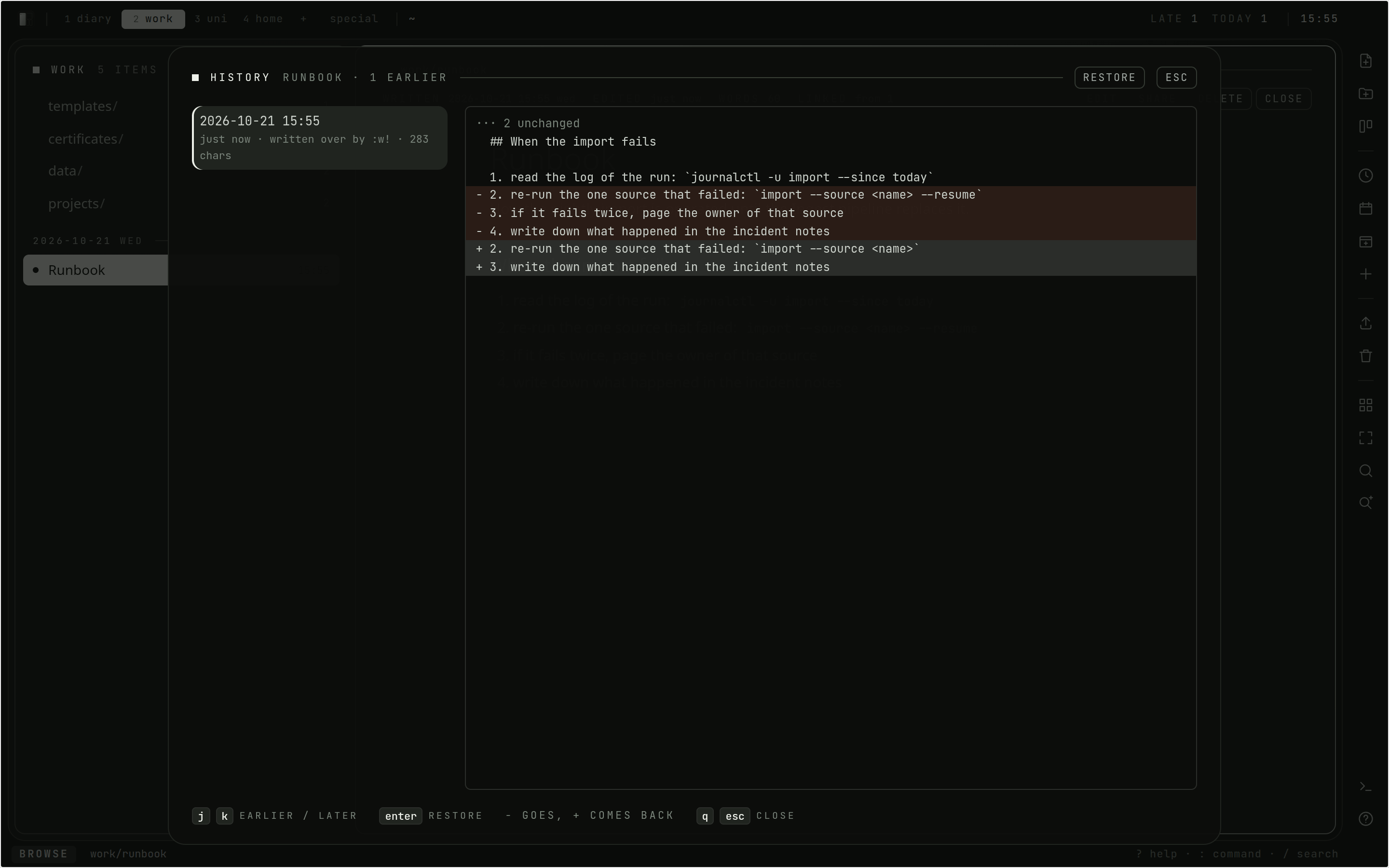
-
Saved in two places? A document saved somewhere else since you opened it is not overwritten:
:wsays so,:e!takes the other version, and:w!writes yours anyway.

More in Not losing things.
On a phone
On a touch screen the workspace drops the modal keys, and under 768 pixels
wide the list and the open document take the whole screen in turn. A dock along
the bottom has a new document, a new folder, the board, today's entry, an
upload, the trash and a search. The ⋯ on a row, or a long press, has
everything that can be done to it: rename, move, share, seal, delete. The agenda
has a done button on each card.
 |
 |
:set vim turns the vim keys on for a phone with a keyboard.